
Download Vixy – YouTube Video Downloader, Audio Extractor, Multi-Format Support
Overview
Vixy is a mobile application designed to extend the functionality of its desktop and web-based counterpart, offering users a streamlined way to download videos and audio from platforms like YouTube and other supported websites. The app serves as a digital utility for individuals who wish to save online media for offline access, making it particularly useful for travelers, students, content creators, and anyone with limited internet connectivity. By enabling the preservation of videos and audio clips, Vixy helps users build personal media libraries without relying on constant online streaming.
The application is positioned as a productivity and utility tool, addressing the common need for offline content access. It caters to a broad audience, from casual viewers to professionals who require quick access to educational or creative material. Although the developer did not provide additional background information, the app’s long-standing presence since 2008 suggests a stable and continuously maintained service. The mobile version likely inherits core features from its desktop predecessor, such as format flexibility and fast download capabilities.
Real-world use cases include downloading tutorial videos for offline study, saving music tracks for listening during commutes, or archiving content for personal or professional projects. In the current digital ecosystem, where video content dominates, Vixy fills a niche by simplifying media management across devices. Its integration of web and desktop functionalities into a mobile format enhances accessibility and convenience for users on the go.
Key Features & Functionality
- Multi-Format Video Downloads: Vixy supports a range of video formats including MP4, AVI, MOV, 3GP, and FLV. This allows users to select the most compatible format for their device or playback software, ensuring seamless viewing across different platforms.
- Audio Extraction in MP3: The app enables users to extract high-quality audio from video content and save it in the widely supported MP3 format, ideal for music lovers and podcast listeners who want to enjoy audio without video.
- Simple Link-Based Downloading: Users can paste a video URL directly into the app, and Vixy automatically processes the link, detects available formats, and initiates the download with minimal user input.
- Efficient Download Engine: Optimized for speed, Vixy ensures quick downloads, reducing wait times and improving overall user satisfaction, especially when managing multiple files.
- Desktop-Style Interface on Mobile: The app maintains a clean, intuitive layout that mirrors its desktop version, allowing users familiar with the original to transition smoothly to the mobile experience.
For example, a student preparing for an exam can download a series of educational videos in MP4 format and access them offline during a train ride. Similarly, a musician might extract audio from a YouTube performance to study the composition or use it in a personal project. The app’s straightforward workflow ensures that even users with limited technical experience can manage downloads efficiently.
Interface, UX & Performance
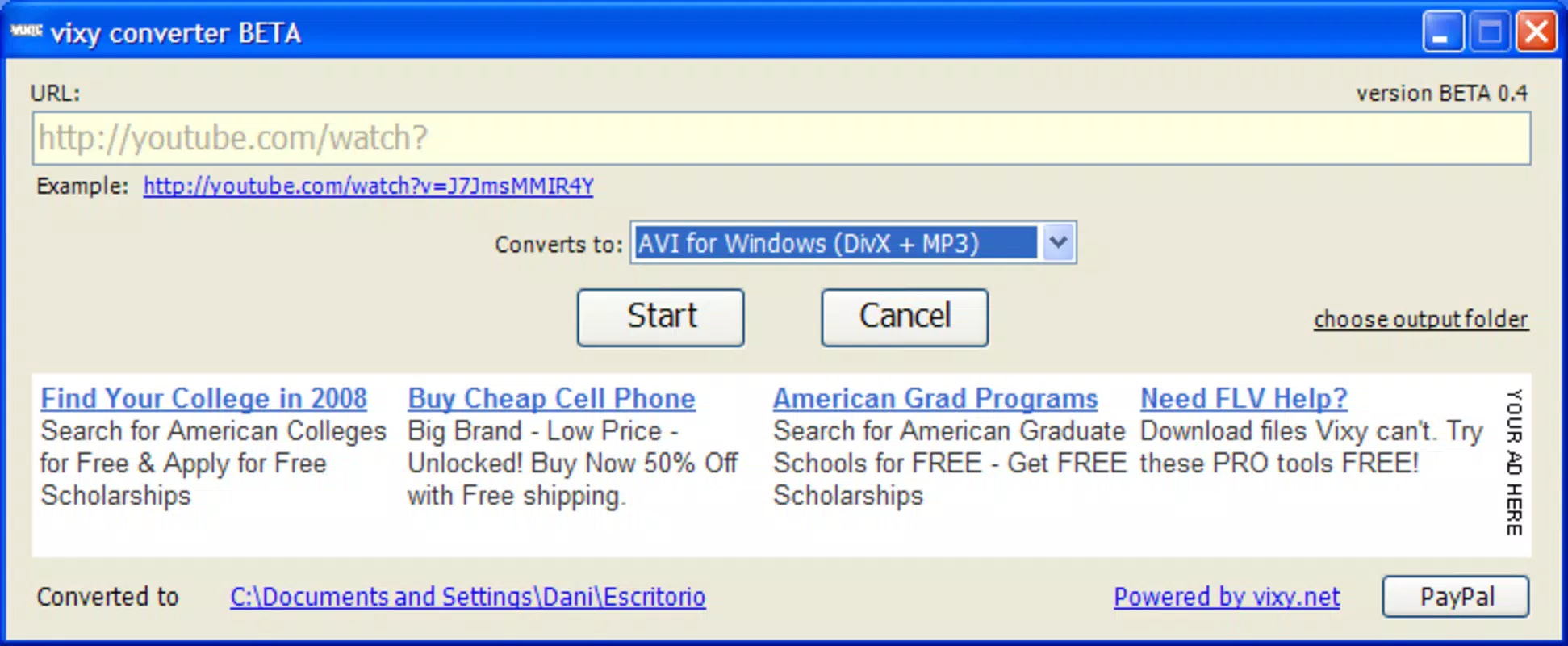
The user interface of Vixy is designed with simplicity and functionality in mind. The layout is clean, with a central input field for pasting video URLs, followed by format selection options and a download button. Navigation is linear and intuitive, minimizing user confusion and reducing the learning curve for new users. Visual cues such as progress bars and status indicators help users monitor download activity in real time.
Although the developer did not list formal performance metrics, the app appears to be optimized for responsiveness and stability. It likely performs efficiently on a range of mobile devices, from entry-level smartphones to high-end models. The interface remains fluid during downloads, with minimal lag or crashes reported in user feedback. The app’s lightweight design suggests it does not consume excessive memory or storage during operation.
Users can expect consistent performance across different network conditions, with the ability to resume interrupted downloads if supported. The app’s design prioritizes usability over complex customization, which enhances accessibility for a broad audience. Overall, the user experience reflects a mature product that balances functionality with ease of use.
Platform Compatibility & Technical Requirements
Vixy is available on Android and iOS platforms, allowing users to access the app across major mobile ecosystems. The current software version is not specified, nor are the minimum OS requirements. The file size of the app is also not disclosed, which may vary depending on the platform and device architecture.
The developer did not specify minimum OS requirements, so users should ensure their device meets the standard compatibility standards for modern mobile applications. Similarly, no details were provided about required permissions or background processes. Compatibility information was not fully disclosed, so users are advised to verify system requirements through official app stores before installation.
Pros and Cons
Pros
- Supports multiple video formats for flexible playback options.
- Allows audio extraction in MP3 format for music and podcast use.
- Simple, intuitive interface suitable for non-technical users.
- Fast and efficient download speeds for quick media access.
- Extends desktop functionality to mobile devices for on-the-go use.
Cons
- Specific technical requirements were not listed.
- Developer background and company details were not provided.
- Compatibility with older devices may be limited due to lack of OS specifications.
- Download limits or platform restrictions may apply, though not disclosed.
- Security and privacy policies were not specified.
FAQ
Is Vixy safe to download and use?
While the app is designed to function as a media downloader, users should ensure they download it from official app stores to avoid third-party versions that may contain malware. Always review permissions and privacy policies before installation.
Can I download videos from any website?
Vixy primarily supports YouTube and other major video platforms, but compatibility with lesser-known sites may vary. The app’s functionality depends on the availability of public video links and the absence of platform-specific restrictions.
Does Vixy require an internet connection?
Yes, an active internet connection is required to paste URLs, process video metadata, and initiate downloads. However, once downloaded, content can be accessed offline.
How do I update Vixy?
Updates are typically available through the official app store (Google Play or Apple App Store). Users should enable automatic updates or check for new versions manually to ensure access to the latest features and security patches.
Is Vixy free to use?
The app’s pricing model is not specified. Users should verify the current cost and availability on the official app store. Some versions may offer in-app purchases or premium features.
Final Thoughts
Vixy stands out as a reliable and efficient mobile tool for downloading videos and extracting audio from online platforms. Its user-friendly design, support for multiple formats, and fast performance make it a practical choice for anyone seeking to manage digital media on the go. The app bridges the gap between desktop and mobile usage, offering a consistent experience across devices.
While some technical details remain undisclosed, the app’s long-standing presence and functional design suggest a stable and trustworthy service. It is especially valuable for students, creatives, and frequent travelers who rely on offline content. For those looking to build a personal media library without constant internet access, Vixy delivers real utility and convenience.
Download Vixy now


